
- Home
- Getting Started
- Documentation
- Release Notes
- Tour the Interface
- Tour the Layers
- JMARS Video Tutorials
- Lat/Lon Grid Layer
- Map Scalebar
- Nomenclature
- Crater Counting
- 3D
- Shape Layer
- Mosaics
- Map
- Advanced/Custom Maps
- Graphic/Numeric Maps
- Custom Map Sharing
- Stamp
- THEMIS
- MOC
- Viking
- CRISM Stamp Layer
- CTX
- HiRise
- HiRISE Anaglyph
- HiRISE DTM
- HRSC
- OMEGA
- Region of Interest
- TES
- THEMIS Planning
- Investigate Layer
- Landing Site Layer
- Tutorials
- Video Tutorials
- Displaying the Main View in 3D
- Finding THEMIS Observation Opportunities
- Submitting a THEMIS Region of Interest
- Loading a Custom Map
- Viewing TES Data in JMARS
- Using the Shape Layer
- Shape Layer: Intersect, Merge, and Subtract polygons from each other
- Shape Layer: Ellipse Drawing
- Shape Layer: Selecting a non-default column for circle-radius
- Shape Layer: Selecting a non-default column for fill-color
- Shape Layer: Add a Map Sampling Column
- Shape Layer: Adding a new color column based on the values of a radius column
- Shape Layer: Using Expressions
- Using JMARS for MSIP
- Introduction to SHARAD Radargrams
- Creating Numeric Maps
- Proxy/Firewall
- JMARS Shortcut Keys
- JMARS Data Submission
- FAQ
- Open Source
- References
- Social Media
- Podcasts/Demos
- Download JMARS
JMARS release 5.6.4
JMARS release 5.6.4 delivers internal improvements and bug fixes, plus a new copy/paste feature that lets users quickly copy shapes between Custom Shape layer instances for easier reuse.
JMARS Release 5.6.4: Shape Copy/Paste and Internal Enhancements
This release focuses primarily on internal improvements and bug fixes, with one key user-facing enhancement. Users can now copy and paste shapes between Custom Shape layer instances, making it easier to reuse geometry across layers. Additional updates improve shape import/export, editing behavior for circles and ellipses, table interactions, and overall application stability.
New Feature: Copy and Paste for Shapes
Several users have recently asked for a faster way to move shapes between Custom Shape layers. We’re happy to share that this request has been implemented in this release.
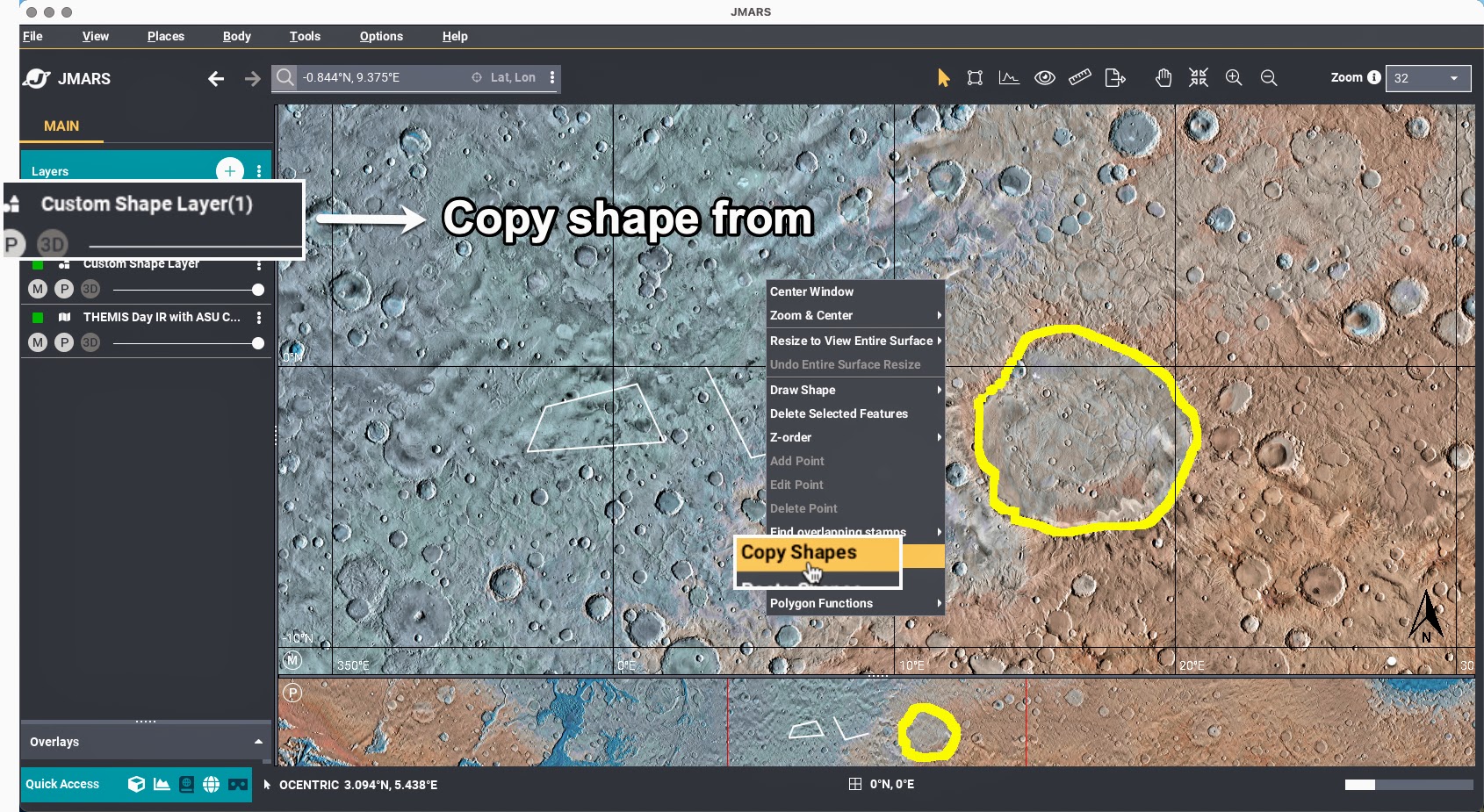
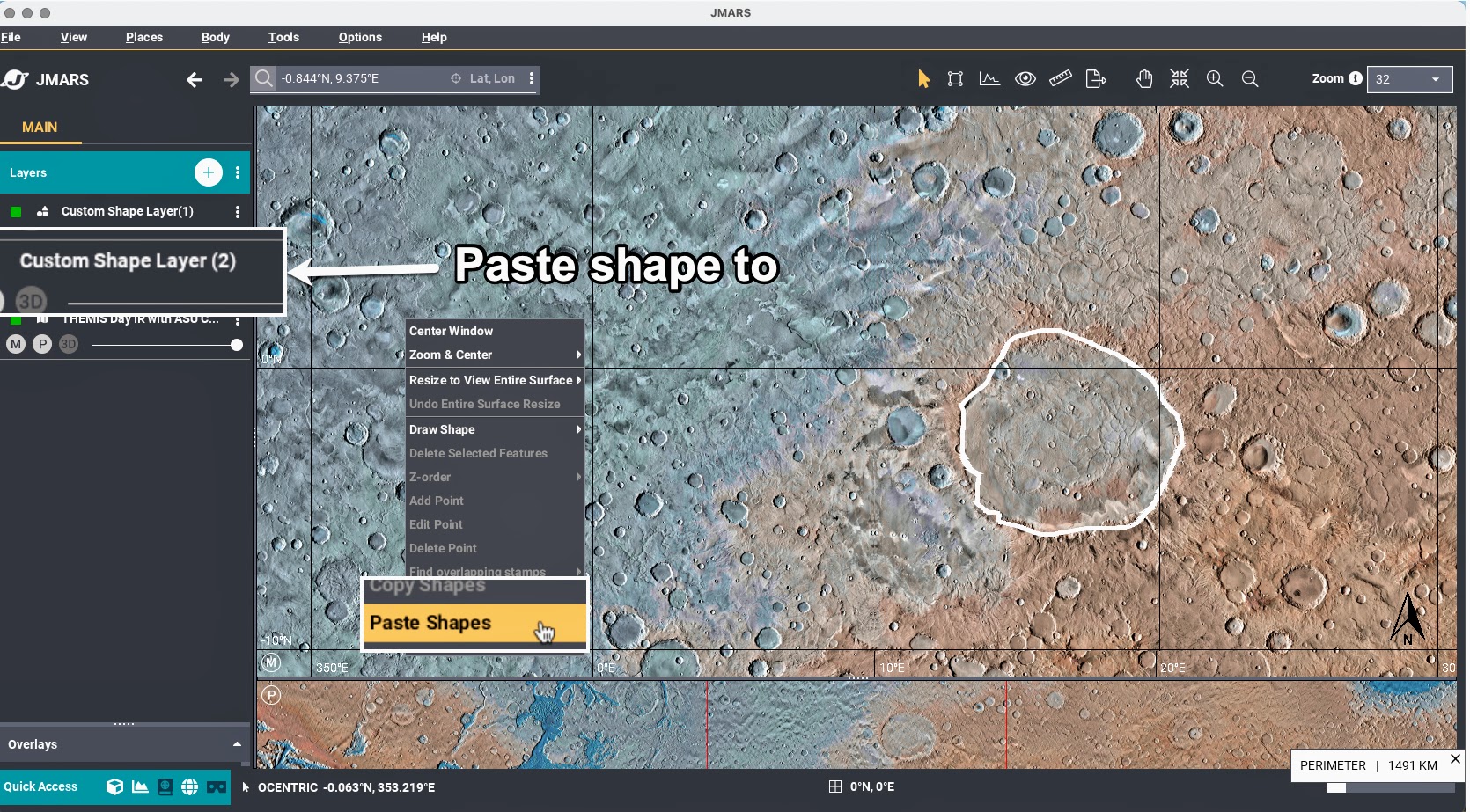
Users can now copy one or multiple shapes from a Custom Shape layer and paste them into another Custom Shape layer. This makes it much easier to reuse geometry across layers without recreating shapes manually.
In the example shown below, a user copies a selected polygon from Custom Shape Layer (1) and pastes it directly into Custom Shape Layer (2).
Important note: Only the shape’s geometry is copied between layers. Other attributes or metadata are not transferred.
Bug Fixes and Internal Improvements
The remaining updates in this release focus on stability, correctness, and internal workflow improvements:
- Improvements to shape export/import, including a new preference to control how many decimal places are written during export
- Fix for an autosave-related issue
- Update to the Edit Circle/Ellipse function to correctly apply selections when an existing geometry source is present
These changes are largely behind the scenes but contribute to a more reliable and consistent user experience.